
Most restaurant websites are built to look good. Very few are built to be found.
That gap is what on-page SEO closes. On-page SEO is everything you control on your own website: your page titles, your headings, your menu content, your images, the way your pages link to each other, and how clearly each page answers the question someone typed into Google.
It is not the same as your Google Business Profile, and it is not the same as reviews or backlinks. Those sit outside your website. On-page SEO is the part you own outright, and it is usually the part restaurants have neglected the longest.
Spark Digital UK works with restaurants, cafés and takeaways on local visibility, Google Business Profile management and website SEO. The issues below are the ones that come up again and again in restaurant website audits.
This guide walks through how to optimise each type of page a restaurant website actually has.
Start With Search Intent, Not Keywords
This is the part most guides skip, and it is the part that matters most.
Two people can search for the same restaurant and want completely different things. Your website needs a page for each of those things.
Look at how the intent changes:
| What someone searches | What they actually want |
|---|---|
| restaurants in Harrow | To discover options. They haven’t decided anything yet. |
| Indian restaurant Harrow | To narrow by cuisine. They know what they want to eat. |
| Indian restaurant menu Harrow | To check dishes and prices before committing. |
| Indian takeaway Harrow | To order food to their home, tonight. |
| book private dining Harrow | To reserve a space for a group or occasion. |
| best biryani Harrow | To find one specific dish done well. |
Each of these needs a different page. Sending all six searches to your homepage means five of them land somewhere that doesn’t answer their question. Most of those people leave.
A menu search should land on your menu. A takeaway search should land on a page that explains delivery areas, times and how to order. A private dining search should land on a page with capacity, packages and an enquiry form.
Before you optimise anything, ask one question about each page: what is the specific job of this page? If you can’t answer it in a sentence, the page has no clear intent, and Google will struggle to rank it for anything.
Mapping Keywords to Pages
Once you understand intent, keyword research becomes simple. You are not hunting for one magic keyword. You are matching each page to the searches it can genuinely answer.
Restaurant searches fall into predictable patterns:
- Restaurant + location — restaurants in Harrow, places to eat Wembley
- Cuisine + location — Italian restaurant Harrow, Afghan restaurant Kenton
- Dish + location — wood-fired pizza Wembley, biryani Edgware
- Service + location — Indian takeaway Harrow, brunch Stanmore
- Occasion + location — private dining Harrow, birthday restaurant Wembley
- Research terms — [restaurant name] menu, [restaurant name] opening hours
Now map them:
| Page | Primary focus |
|---|---|
| Homepage | Italian restaurant in Harrow |
| Menu page | Italian restaurant menu |
| Location page | Italian restaurant Harrow |
| Delivery page | Italian food delivery Harrow |
| Private dining page | private dining Harrow |
| Individual dish or cuisine page | wood-fired pizza Harrow |
One focus per page. That is the rule that keeps everything else clean.
The most common problem we find during audits is not missing keywords. It is the opposite: three or four pages all built around the same term, competing with each other. Google has to choose one, and it often chooses the weakest. Give each page its own job and that problem disappears.
And be honest about the match. A page only ranks for a term if the content genuinely delivers on it. Adding “private dining Harrow” to a page with no information about private dining will not work, and it makes the page worse for everyone who lands on it.

How to Optimise Each Restaurant Page
Homepage
Your homepage answers one question: what is this restaurant, and where is it?
Someone should know your cuisine and your area within the first few seconds. Plenty of restaurant homepages we review open with a full-screen photo and the word “Welcome” beautiful, but it tells Google and the visitor nothing.
Include:
- Cuisine type, stated plainly
- Your location or neighbourhood
- What makes you different wood-fired oven, family recipes, rooftop seating, whatever is genuinely true
- Opening hours, or a clear link to them
- A booking or ordering call to action, visible without scrolling on mobile
- Links through to your menu, location and booking pages
Keep the homepage as an overview. It should not try to be the menu page, the location page and the events page all at once.
Menu Page
This is usually the most visited page on a restaurant website, and usually the worst optimised.
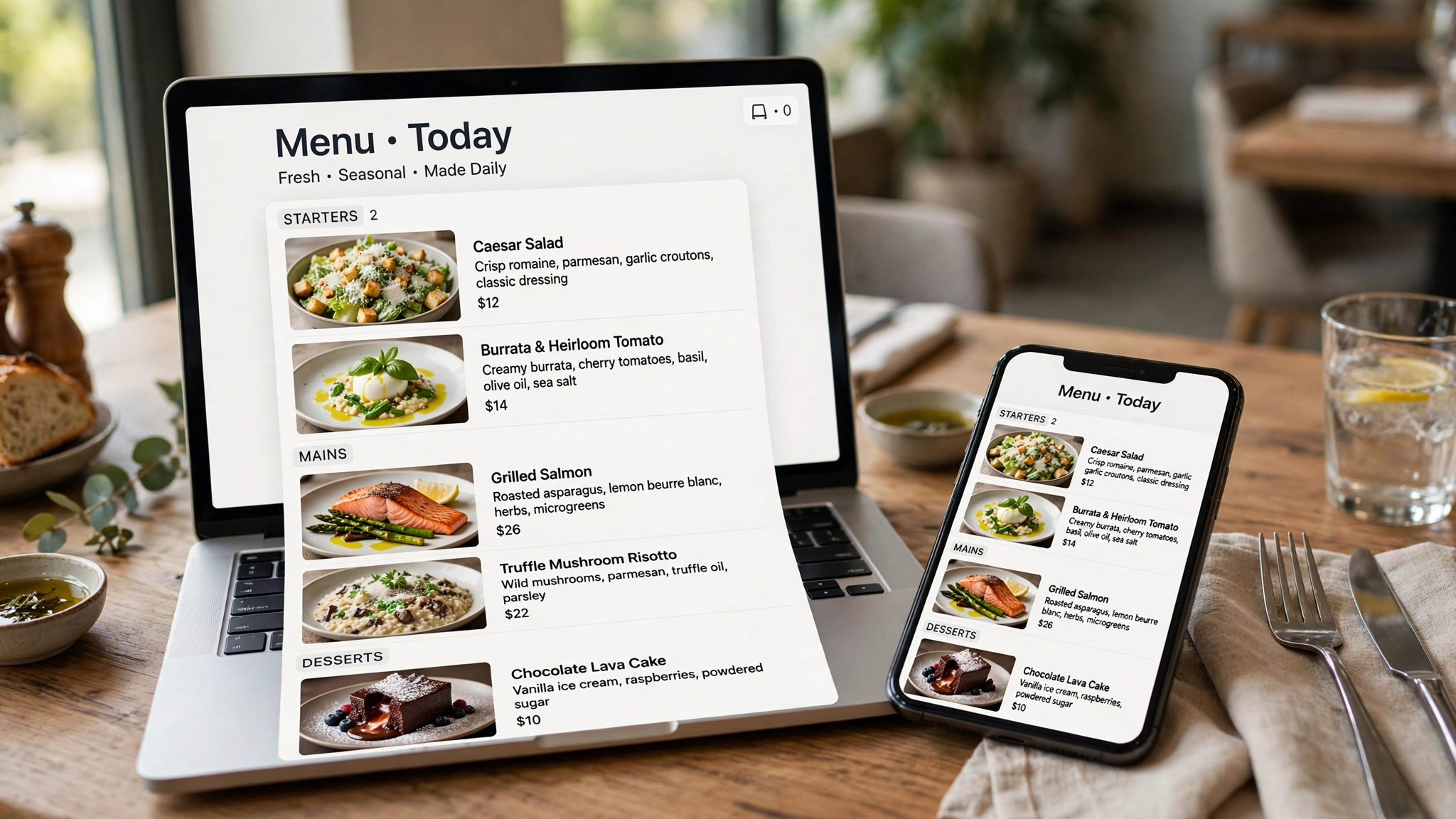
The single biggest issue: the menu is a PDF or an image. Search engines can extract very little from a scanned menu photo, and it is painful to read on a phone. Every dish name, ingredient and category on that image is invisible as text.
Publish your menu as real, crawlable text on the page. If you also want a downloadable PDF, offer it as an extra, not as the only version.
Then:
- Break the menu into clear categories with proper headings Starters, Pizzas, Curries, Desserts
- Give dishes real descriptions. “Lamb karahi” tells Google nothing. “Slow-cooked lamb karahi with tomato, ginger and green chilli, served with naan” tells it a great deal
- Include prices. People look for them, and hiding them costs you enquiries
- Mark dietary information where it applies vegetarian, vegan, gluten-free, halal
- Link out to related pages: your booking page, your takeaway page, a dedicated vegan menu if you have one
Menu descriptions are also where dish-level searches get picked up naturally. You don’t need to force them.
Location Page
If you have one site, this can live within your contact page. If you have several, each location needs its own page.
Each location page needs:
- The full address, exactly as it appears on your Google Business Profile
- The area or neighbourhood, written the way locals refer to it
- Opening hours for that specific site
- A phone number for that site
- Directions, parking notes, and the nearest station or landmark
- Photos of that actual location
The failure mode here is templated pages. We regularly see multi-site restaurants with three location pages that are word-for-word identical except for the town name. Those pages add very little, and they can end up competing with each other.
Write each one properly. What is near it, who eats there, what is different about that site. If a location genuinely has nothing unique to say, one strong page serves you better than three thin ones.
Booking or Reservation Page
Short page, high value.
Make the booking method obvious a form, a phone number, or your reservation platform. Test it on a phone, because that is where most people will use it.
Include how far ahead you take bookings, group size limits, and any deposit policy. Add the location and hours as context so someone landing here directly isn’t stuck.
One issue we see often: the booking button is in the header on desktop and buried three taps deep on mobile.
Private Dining and Events Page
This page attracts some of the highest-value enquiries a restaurant gets, and it is the page most likely to be missing entirely.
Cover:
- The types of events you host birthdays, corporate lunches, engagement parties, wakes
- Capacity, seated and standing
- Whether the space is private, semi-private or a section of the main room
- What is included set menus, drinks packages, AV, decoration
- Rough pricing or a starting point
- A clear enquiry route, and how quickly you respond
- Photos of the space actually set up for an event
Someone planning a 30-person birthday is comparing three or four venues. The one that answers capacity and pricing questions on the page usually gets the enquiry.
Delivery and Takeaway Page
If you offer collection or delivery, that deserves its own page rather than a line on the homepage.
Include the areas you deliver to, delivery times and hours, minimum order, fees, how to order your own site, phone, or the platforms you’re on and whether collection is available.
If you’re on Deliveroo, Uber Eats or Just Eat, link to those listings. Also be clear about what ordering direct gets people, if anything.
Contact Page
Simple, and often overlooked.
Business name, address, phone, email, opening hours, a map, and how to reach you for different things bookings, events, press, complaints. Keep it accurate. An outdated phone number here quietly loses enquiries for months.
The On-Page Elements That Apply to Every Page
Page Titles
The title tag is what shows as the clickable headline in search results. It carries real weight and it is the fastest thing to fix.
Aim for roughly 50 to 60 characters so it isn’t cut off on mobile.
A workable pattern: Restaurant Name Cuisine in Location | Distinguishing detail
- Farmhouse Pizza — Wood-Fired Pizza in Wembley
- Cloud7 Brunch — Weekend Brunch in Edgware
- Kabul Korner — Afghan Restaurant in Harrow
Give every page its own title. “Home”, “Menu” and “Untitled Page” appear on restaurant sites more often than you’d expect, and they waste the most visible piece of text you have in search results.

Meta Descriptions
The meta description is the summary text below your title in search results.
To be accurate about this: meta descriptions are not a direct Google ranking factor. Google also rewrites them frequently, pulling text from the page instead. Writing a good one does not cause your rankings to rise.
What it can do is make your result clearer and more appealing to the person scanning the page, which may encourage a click. That is a reasonable goal on its own.
Keep it to roughly 120–160 characters, describe what is actually on the page, and include something specific: your area, a signature dish, your opening hours, a booking prompt.
Heading Structure
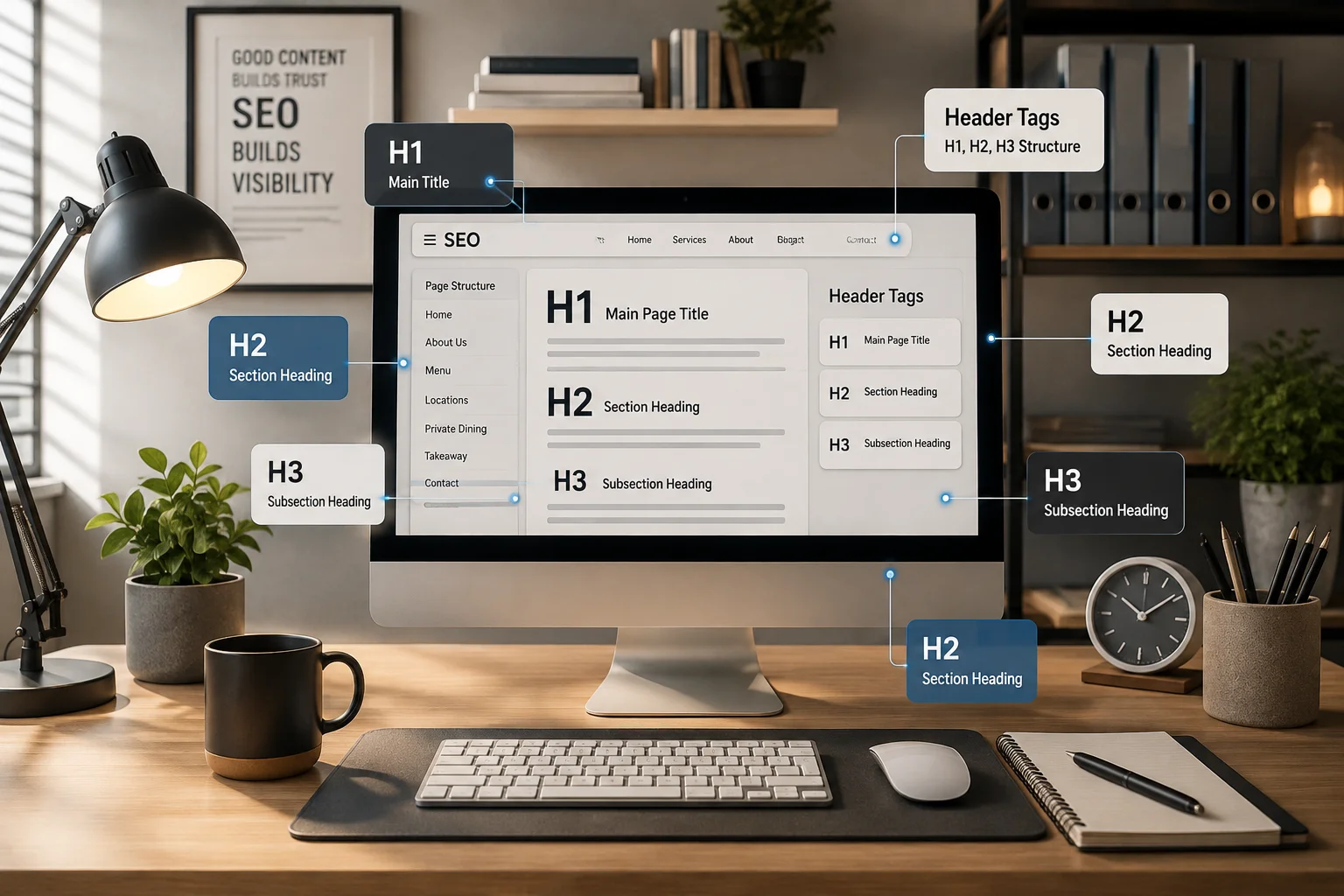
One H1 per page, describing what that page is. Then H2s for main sections and H3s beneath them.
For a menu page:
- H1: Our Menu
- H2: Starters
- H2: Wood-Fired Pizzas
- H3: Classic Pizzas
- H3: Speciality Pizzas
- H2: Desserts
- H2: Dietary Information
Headings help search engines understand structure and help people scan on a phone. They are not a place to stack keywords a heading full of location terms reads badly and helps nobody.
Content Quality
Write for the person deciding where to eat tonight.
Short paragraphs. Short sentences. Plain words. Specific detail instead of adjectives “our dough proves for 48 hours” beats “the finest quality ingredients” every time.
Thin pages are a real problem for restaurants. A location page with an address and nothing else, or an events page with two sentences, gives Google very little to work with and gives the visitor even less.
Images
Restaurant sites are image-heavy, so this matters more here than in most industries.
Search engines do not read images literally, but they aren’t relying on alt text alone either. They use the filename, the surrounding text on the page, captions, and page context together to work out what an image shows.
Practical approach:
- Use descriptive filenames
wood-fired-margherita.jpgrather thanIMG_4821.jpg - Write alt text that accurately describes the image. Alt text exists primarily for accessibility it is what someone using a screen reader hears. Describe the picture honestly: “Margherita pizza with basil, fresh from the wood-fired oven.” Don’t stuff your town name into every alt attribute. It doesn’t help rankings and it degrades the experience for the people alt text is actually for
- Compress your files. Restaurant photography is heavy and it is usually the main reason a restaurant site loads slowly
- Put real text near your images. A photo surrounded by descriptive copy is far easier to interpret than one floating alone
Internal Linking
Internal links help Google find your pages and help visitors move through your site in the order they actually think.
Sensible routes for a restaurant:
- Homepage → Menu, Location, Booking, Private Dining
- Menu → Booking, Takeaway, Dietary or vegan menu
- Location → Booking, Contact, Menu
- Private Dining → Contact, Menu
- Blog post → the relevant service or location page
Use descriptive anchor text that reads naturally. “See our full menu” or “book a table in Harrow” works. “Click here” tells Google nothing. Repeating “Italian restaurant Harrow” as anchor text on every link goes too far the other way.
Structured Data for Restaurants
Structured data is extra code on your page that describes your business in a format search engines can read directly. It doesn’t change what visitors see.
For restaurants, the relevant schema types can describe things like:
- Restaurant name
- Address and geographic location
- Phone number
- Opening hours, including special hours
- Cuisine type
- Price range
- Menu, and menu sections and items
- Whether you accept reservations
- Delivery and takeaway availability
Two honest caveats. Structured data does not directly improve your rankings, and adding it does not guarantee that Google will show any enhanced result for your site. Google decides what to display and changes its mind regularly.
What it does do is remove ambiguity. It states your hours, your address and your cuisine in a form that leaves less room for misinterpretation by Google, and increasingly by AI assistants pulling restaurant information into their answers.
Two rules: the structured data must match what is visible on the page, and it must be accurate. Marking up hours you don’t keep is worse than no markup at all. If you use WordPress, Rank Math and Yoast both handle the basics, and Google’s Rich Results Test will validate what you’ve added.
Technical Points That Affect On-Page SEO
You don’t need to become a technical SEO to handle these, but they directly affect whether your on-page work pays off.
Mobile usability. Most people looking for somewhere to eat are on a phone, often standing outside somewhere else. Tap targets, readable text without pinching, a phone number that dials when tapped, a booking flow that works one-handed.
Page speed. Uncompressed food photography is the usual culprit on restaurant sites. Compress images, enable lazy loading and check your site on Google PageSpeed Insights.
Crawlable menu content. Worth repeating. If your menu is an image or sits behind JavaScript that doesn’t render, it effectively doesn’t exist for search.
Indexability. Check in Google Search Console that your key pages are actually indexed. We have found restaurant sites where the booking page was blocked in robots.txt from a redesign months earlier.
Duplicate and near-duplicate pages. Common with multi-location sites and with pages that exist at more than one URL. Canonical tags tell Google which version is the main one.
Thin pages. A page that exists but says nothing rarely helps. Improve it or merge it.
Common On-Page Mistakes on Restaurant Websites
These are the patterns that show up most often:
- Homepage doesn’t state cuisine or location. A full-screen photo and the word “Welcome” tells nobody anything.
- The menu is only a PDF or an image. Your most searched content, invisible as text.
- Location pages are near-identical. Same copy with the town swapped out.
- Multiple pages target the same term. They compete, and Google picks one often not the one you wanted.
- Booking information is hard to find. Especially on mobile.
- Opening hours are out of date. Bank holidays and seasonal changes are the usual gaps, and mismatched hours between site and Google Business Profile cause the same problem.
- Weak or missing internal links. Orphan pages nothing links to. Menu pages that don’t link to booking.
- No structured data, or structured data that contradicts the page.
- Poor mobile experience. Tiny text, buttons too close together, slow-loading galleries.
- Generic page titles. “Home”, “Menu”, “Untitled”.
- Thin location and events pages. An address and nothing more.
- Keyword stuffing. “Best Italian restaurant Harrow” repeated in every heading. It reads badly and it doesn’t work.
What Realistic Results Look Like
Be careful with anyone who gives you a fixed timeline. SEO outcomes depend on your competition, your existing site authority, the technical state of your website, the quality of your content, your local signals, and the specific query.
What can be said fairly:
Some changes register quickly. Fixing a page title or getting a previously blocked page indexed can show up in Google Search Console within days or weeks, because you have changed something Google reads directly.
Meaningful movement on competitive local terms usually takes longer typically several months of consistent work, not weeks. Restaurant search in areas like Harrow and Wembley is competitive, and the businesses above you are often working on it too.
Nobody can guarantee a position. Google’s results change constantly and no agency controls them. What good on-page SEO does is make sure your website is not the reason you’re losing visibility.
Track it properly. Google Search Console shows which queries bring impressions and clicks to which pages. That is the honest measure of whether your on-page work is landing.
Frequently Asked Questions
Is on-page SEO enough to rank a restaurant on Google?
No. On-page SEO makes your website eligible to rank. Local visibility also depends on your Google Business Profile, reviews, citation consistency and links from other sites. On-page work without those signals tends to underperform and strong off-page signals with a poor website waste the traffic they generate.
My menu is a PDF. Does that really matter?
Yes, and it’s usually the highest-impact fix on a restaurant site. A PDF or image menu means your dish names, categories and descriptions are largely unreadable to search engines and awkward for phone users. Publish the menu as text on the page and keep the PDF as an optional download.
How many keywords should one page target?
One primary focus, with a handful of related terms that fit naturally. If a page is trying to rank for six different things, it usually ranks well for none of them.
Do I need a separate page for every location?
If each location has genuinely distinct information address, hours, team, parking, character — then yes. If you’d be publishing the same text with the town swapped, one strong page is better than several weak ones.
Does structured data improve my rankings?
Not directly. It helps search engines interpret your business information accurately, and it can make your site eligible for certain result features, though Google decides whether to show them. It should always match what’s visible on the page.
Should I write blog posts for my restaurant?
Only if you have something worth saying. Posts about your local area, seasonal menus, or the story behind your dishes can attract searches your main pages can’t. Publishing generic filler adds nothing.
How do I know if my on-page SEO is working?
Google Search Console. It shows which searches bring impressions and clicks to each page. If a page is getting impressions but few clicks, the title and description need work. If it’s getting neither, the page isn’t matching the intent behind the searches you want.
Want to See Where Your Restaurant Website Can Improve?
If you’re unsure which on-page issues are holding your restaurant website back, Spark Digital UK can review your site and identify the areas with the biggest opportunities.
